# Voice Overview
> Real-time voice AI and telephony over QUIC. Place and receive calls. Stream audio both ways. Attach an AI agent from one typed client.
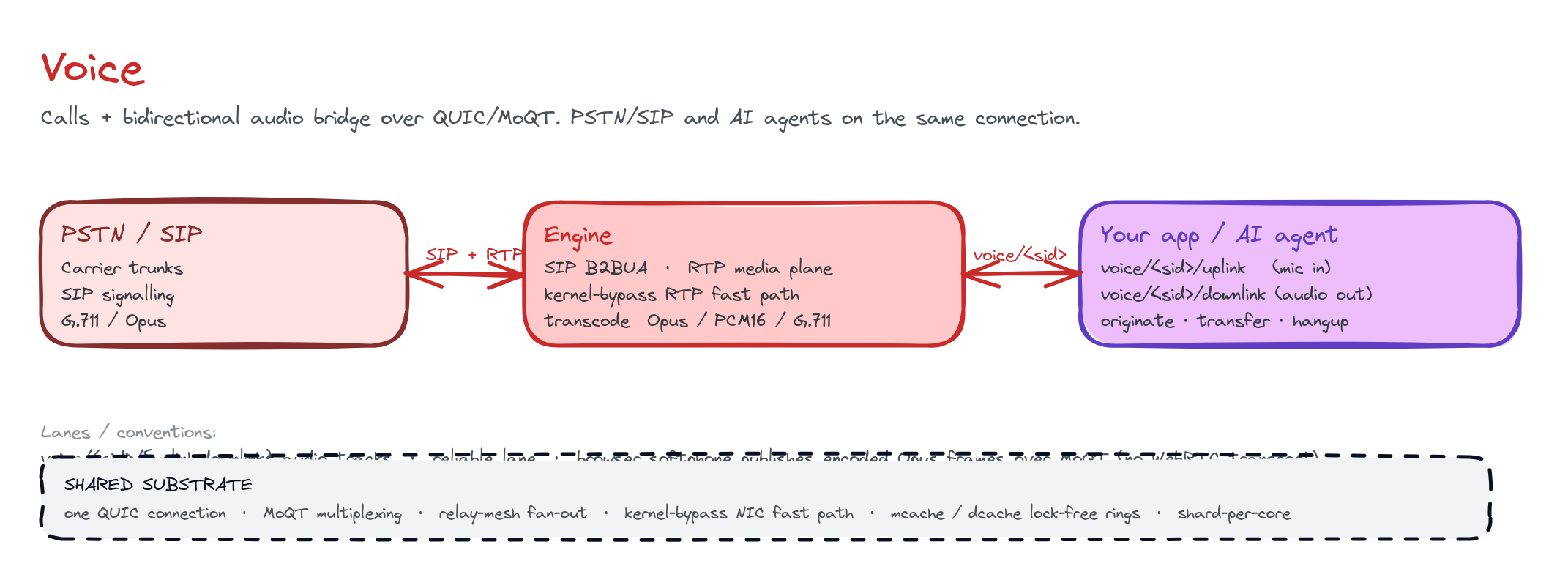 FirstByte Voice adds phone calls and real-time audio to your app.
You can place and receive calls over the phone network or SIP.
You can stream the audio both ways.
You can attach an AI agent to any call.
You do all of this from one typed client. You do not run any media
infrastructure yourself.
Every operation addresses **one identifier**: a call's `sid`. The PSTN leg, the
SIP leg, the browser softphone leg, and the AI-agent leg all connect to it.
## The two primitives (plus agents)
- **Calls — the control plane** — Originate, fetch, transfer, and hang up calls. The API is HTTP-shaped and
idempotent. Every call returns a `Call` handle keyed by a single `sid`. Use
this plane to *manage* a call.
- **AudioBridge — the data plane** — Bidirectional encoded audio over MoQT tracks at
`voice//{uplink,downlink}`. The *media* flows on this plane. You can
subscribe to caller audio and publish audio back, frame by frame.
The third piece is **Agents**. You bind a server-side AI agent to a `sid`. The
engine then connects the bridge end-to-end and drives the conversation for you.
You write the agent. You do not write the transport code.
The split is deliberate. The control plane is a request/response API that you
can call from any backend. The data plane is a low-latency media path. You use
the data plane only when you want the raw frames. For an AI voice agent, you
often use neither plane directly. You attach an agent, and the engine operates
both planes.
## When to use it
- **Outbound + inbound calling** — Originate calls to E.164 numbers over a SIP trunk. Accept inbound calls
that the SIP gateway terminates. One control surface serves both directions.
- **AI voice agents** — Attach a speech-to-speech agent to a live call. The engine bridges audio
both ways and handles turn-taking and barge-in.
- **Programmable audio** — Subscribe to caller audio (uplink) and feed it into your own ASR. Publish
synthesized audio (downlink) back. You have full codec control.
- **Browser softphone** — Place and answer calls from the browser with encoded Opus over MoQT. The
media path has no SFU and no gateway round-trips.
## The wire model
A call's media is two MoQT audio tracks under a per-call namespace:
```
voice//uplink caller / device → cloud (what the caller is saying)
voice//downlink cloud → caller / device (what is played back)
```
"Uplink" and "downlink" are defined from the **caller's** point of view. Each
track carries a **capability** tag (for example `voice/opus`). The relay routes
on that capability. A recording sidecar, an ASR consumer, or an AI-agent attach
can subscribe to a call's audio. The publisher does not know that these
subscribers exist. You route on **intent**, not on a hardcoded peer.
> **NOTE:**
> When you attach as the **server**, you subscribe to the uplink and publish the
> downlink. When you attach as the **browser** caller, you do the opposite: you
> publish the uplink (mic) and subscribe to the downlink (playback). Distinct
> tracks for each direction prevent self-subscribe feedback.
## Call lifecycle
The control plane reports a status. The status moves monotonically toward a
terminal state:
```
dialing → ringing → in_progress → completed | failed | no_answer
```
`originate()` returns as soon as the call is `dialing`. Fetch the call again to
read the latest status. `transfer()` points the live audio at a new number (a
SIP `REFER` on the wire) or attaches a different agent. The `sid` stays the
same. `hangup()` ends the call and drops both tracks.
A **SIP gateway** terminates inbound PSTN calls. The gateway acts as a
back-to-back user agent (B2BUA). It negotiates signalling with the carrier. It
answers the call. It publishes the audio onto the same
`voice//{uplink,downlink}` tracks. At the SDK surface, an inbound call
looks the same as an outbound one.
## Codecs
The bridge transcodes between the codec that the call leg negotiated and the
codec that your code requests. For example: PSTN µ-law comes in, your code
receives Opus, your code sends Opus, and µ-law goes back out. Your process
needs no media tooling.
| Codec | When to use it |
| ------------ | ------------------------------------------------------------------- |
| `opus` | Default. Best quality per bit. Native in the browser path. |
| `pcm16` | Use when a realtime model wants raw 16-bit PCM. Many models do. |
| `g711_ulaw` | PSTN-direct, no transcoding. µ-law (North America / Japan). |
| `g711_alaw` | PSTN-direct, no transcoding. A-law (most of the rest of the world). |
Inside the runtime, audio is single-channel PCM16 at 8 kHz end-to-end. The
browser path negotiates Opus. The carrier leg negotiates G.711.
## The browser softphone path
The browser places audio on the **same MoQT tracks** as every other client.
There is no SFU on this path:
1. **Capture + encode**
The SDK's capture helper runs the browser's own capture graph (echo
cancellation, gain control, noise suppression). It then diverts the
**encoded** Opus frames onto the uplink track through encoded / insertable
streams. Raw PCM never crosses the wire. The SDK uses only the browser's
Opus encoder. It never uses the browser's WebRTC transport.
2. **Publish over QUIC/MoQT**
The SDK writes each encoded frame to `voice//uplink` as a MoQT object
over WebTransport. The relay fans the frame out to each endpoint that the
engine bridged the call to: the SIP leg, an agent, or a recorder.
3. **Subscribe + play back**
Downlink Opus arrives on `voice//downlink`. The SDK player decodes it
with WebCodecs. The player renders the audio through an audio worklet ring
buffer and pads silence on underrun.
> **NOTE:**
> QUIC/MoQT over WebTransport is first-class and is the default browser path
> (Chrome-family). On Safari, on UDP-blocked corporate networks, or on TCP-only
> proxies, the client falls back to a WebSocket (control/data) or WebRTC (media)
> leg. See
> [Browser compatibility](/modalities/voice/transport-web/browser-compatibility).
## How it works
You get telephony-grade latency at fleet scale. You do not run any media
infrastructure. These mechanisms make that possible:
- **One connection carries everything.** Your audio multiplexes over the same
[MoQT](https://datatracker.ietf.org/wg/moq/about/) substrate as every other
modality. All traffic uses a single QUIC/HTTP-3 connection on port 443. One
auth token authorizes the whole connection. There is no per-track setup.
- **The media path skips the kernel.** The SIP/RTP leg uses a **kernel-bypass**
zero-copy fast path. For steady-state media, packets move between the NIC and
userspace and do not pass through the kernel networking stack.
- **No lock contention on the hot path.** A **shard-per-core** reactor pins each
call to the core that owns it. A flow classifier steers packets to that
shard. Cross-shard hand-off uses **lock-free rings**. A call never takes a
lock while media flows.
- **io_uring** drives async I/O so the media shards stay off the scheduler's
critical path.
- **Secure by default.** Every QUIC connection uses TLS 1.3. Call handshakes use
ECDSA for low per-core signing cost.
## Next steps
- **[Quickstart](/modalities/voice/quickstart/managed-cloud)** — Ship a voice agent in minutes on the managed cloud. You run no
infrastructure.
- **[Core concepts](/modalities/voice/concepts/architecture)** — The end-to-end architecture: signalling, media, transport, and the agent
runtime.
- **[Sessions, calls, tracks & streams](/modalities/voice/concepts/sessions-calls-tracks-streams)** — The object model behind the `sid`. It shows how legs, tracks, and
namespaces fit together.
- **[Agent runtime](/modalities/voice/runtime/overview)** — Bring your own ASR/LLM/TTS or a speech-to-speech provider. This page also
covers tools and the session lifecycle.